![stage-stubs-logo.svg]](https://help.stagestubs.com/hubfs/stage-stubs-logo.svg)
Quick answer: Sign in to Stage Stubs at stagestubs.com/login with your email and password. Booked as a guest and never set a password? Choose one from the link in your booking email, or click Email me a sign-in link on the sign-in page and we'll email you a link that signs you straight in.
You can book tickets on Stage Stubs with just your email address, so there's no need to sign up for anything. That said, a free account makes life a little easier if you go to a few shows: all your orders live in one place, you can download your tickets again whenever you like, and you can ask an organiser for a refund if your plans change.
The good news is that if you've already booked, most of the work is done.
If you've already bought tickets
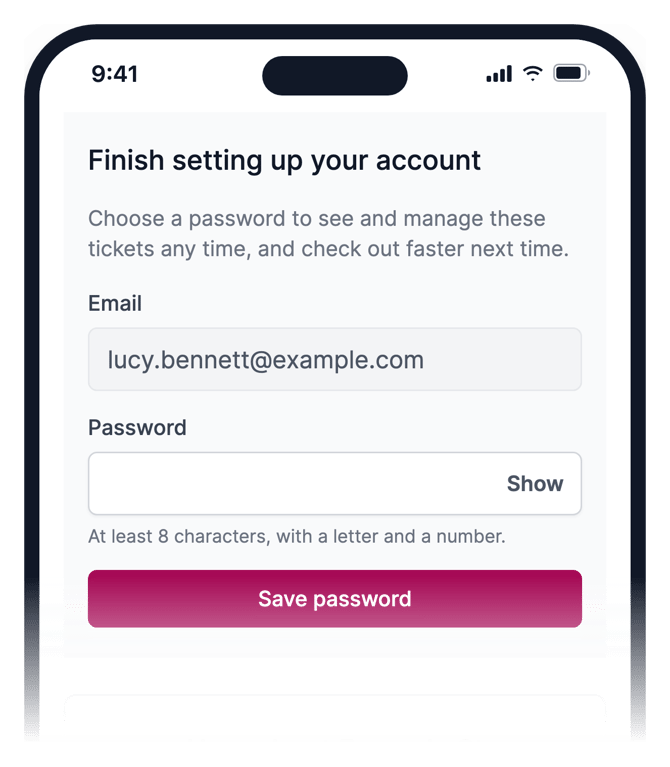
When you book, we quietly set up an account for you behind the scenes. All you need to do is choose a password.
- Right after paying, look for the Finish setting up your account box on the confirmation page.
- Click Choose a password, type one in, and click Save password.
- We'll send you a quick email to make sure it's really you. Click Confirm my email in it, and you're all set.
Missed the box on the confirmation page? No problem at all. Your booking email has a Finish my account button you can use any time in the next 14 days.
If you'd like an account before you book
Some people like to be set up in advance, especially for busy on-sales. Go to stagestubs.com/register/buyer, fill in your details and send the form. You'll go straight into your new account.
If you've booked with that email address before, we'll recognise it and email you a link to finish your existing account instead, so all your orders stay together.
Signing in without a password
Never got round to setting a password, or can't remember it? On the sign-in page, click Email me a sign-in link. We'll email you a link that signs you straight in. It works once, within 15 minutes, so use it while it's fresh.
What you can do in your account
Once you're signed in, My Orders shows every booking you've made. From there you can download tickets and receipts again, send tickets to the people you're going with, or ask the organiser for a refund. Under Settings you can change your name, email address or password, and choose whether you'd like the occasional email from us about shows.
Good to know
If you also run events on Stage Stubs, your organiser account can't be used for buying tickets. Just use a different email address when you book.
Common questions
I've forgotten my password. What do I do? Click Email me a sign-in link on the sign-in page. You'll be signed straight in, and you can set a new password in Settings.
I booked as a guest. Do I have an account? Yes, we made one for you when you booked. Just choose a password to start using it.
Can I use the same account to buy tickets and run events? Not at the moment. Use a different email address for each.
Related guides: Buying tickets · Finding and downloading your tickets
Need a hand? Email us at hello@stagestubs.com and we'll be happy to help.