![stage-stubs-logo.svg]](https://help.stagestubs.com/hubfs/stage-stubs-logo.svg)
Quick answer: Yes. The latest Stage Stubs app saves each show's door list on your phone while it has signal, keeps checking tickets against it if the signal drops, and uploads the scans as soon as you're back online. Open your show in the app on every scanning phone before the doors open.
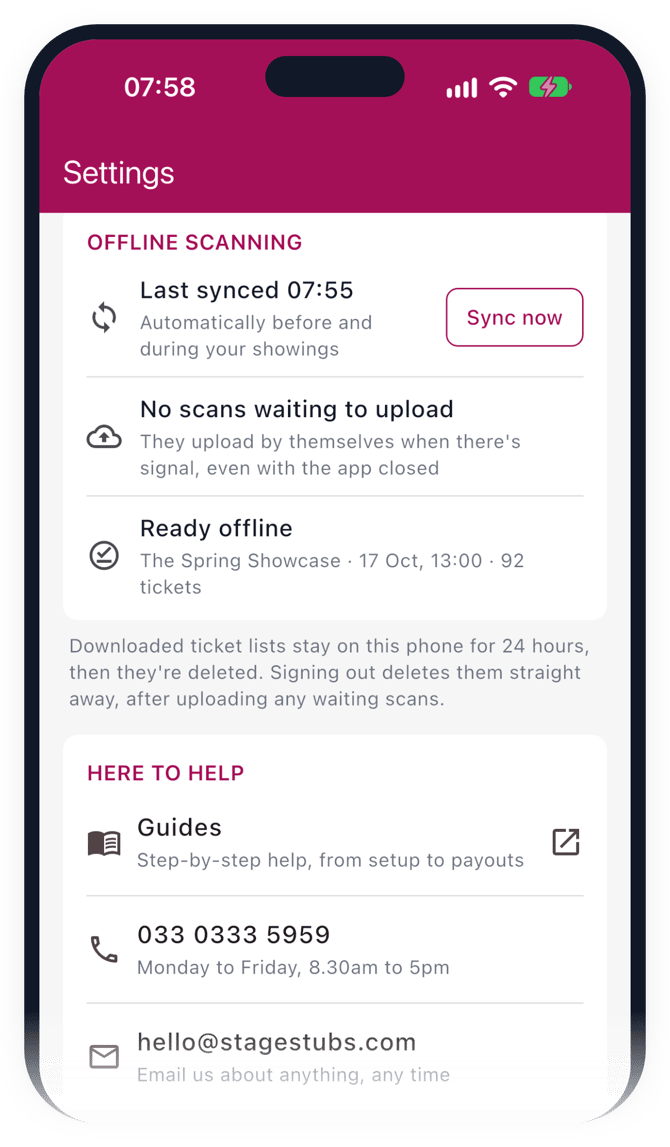
We know how many venues have patchy signal, so the Stage Stubs app saves your show's door list onto your phone while it's connected. If the signal drops at the door, it carries on checking tickets against that saved list, then catches up as soon as you're back online. Nobody gets stuck in the queue.
Before the doors open
Open your show in the app while you still have signal or Wi-Fi, ideally on every phone that will be scanning. That's when the door list is saved. As long as there's signal, it keeps itself up to date as new tickets sell.
At the door
Just scan as normal. If there's no signal, the app checks the ticket against the saved list and tells you whether to let them in.
After the show
The app sends the scans it made offline as soon as it has signal again. To be on the safe side, open the app once you're home on Wi-Fi. We'll also send a gentle nudge to the phone after the show to remind it to catch up.
Good to know
If two phones without signal both let in the same ticket, we'll flag it once they're back online, so nothing is lost.
The saved list keeps buyers' details to a minimum: just their initial and surname, ticket type, seat and order number, and never their email address. And if a helper's access ends during the show, they can still send their offline scans for 3 days afterwards.
Common questions
What if two phones let in the same ticket offline? We flag it once they're back online.
Do I need to do anything after the show? Just open the app on Wi-Fi so it can upload its scans.
Related guides: The Stage Stubs app · Getting ready for show day
Need a hand? Email us at hello@stagestubs.com and we'll be happy to help.