![stage-stubs-logo.svg]](https://help.stagestubs.com/hubfs/stage-stubs-logo.svg)
Quick answer: To cancel an event on Stage Stubs, open it from My Events and click Cancel this event at the bottom of its details. Choose whether to refund customers and include booking fees (both are ticked to start with), add a reason, and confirm. Buyers are emailed and refunded automatically, usually within 5 to 10 working days. Cancelling can't be undone.
We're really sorry if you're having to cancel. It's never an easy decision, so we've made the process as straightforward as we can. Please do read this through first, as cancelling can't be undone.
If you're just moving the show to a new date, you don't need to cancel at all: change the date instead and let your buyers know. See: Changing an event after it's published.
Before you start
You'll need a card saved under Settings and then Saved Cards, in case your Stripe balance doesn't cover all the refunds. If you haven't saved one yet, we'll ask you to add it first.
Cancelling your event
- Go to My Events and click View next to your event.
- At the bottom of the event's information, find Cancel event and click Cancel this event.
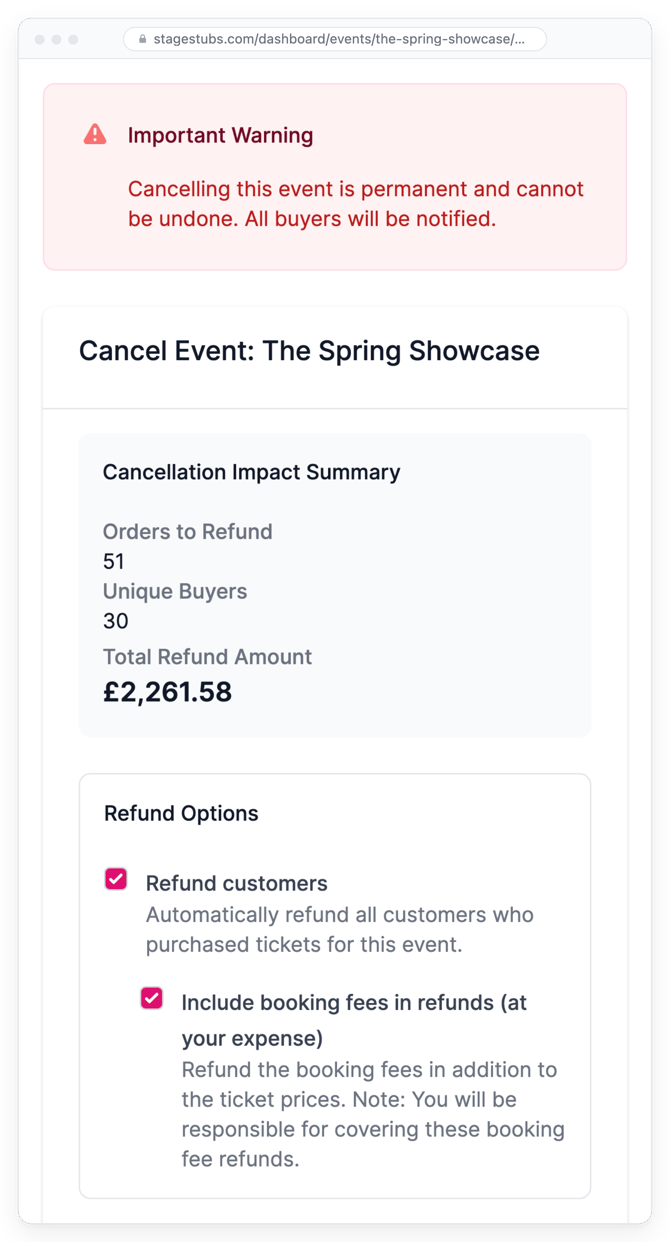
- If tickets have been sold, you'll see a summary of how many orders and buyers are affected, and how much would be refunded.
Choosing how to refund
Two boxes on this page are already ticked for you, so please check them carefully.
Refund customers means we'll refund everyone for you. Only untick it if you're refunding people another way.
Include booking fees in refunds (at your expense) gives buyers their booking fee back too, which you pay for. It's a kind gesture, but untick it if you'd rather not cover the fees.
Under How the refunds are paid you'll see where the money comes from. We use your Stripe balance first (that's ticket money we haven't paid out to you yet), then take one payment from your card for anything left over. Card payments for refunds include a small refund funding fee, which is shown before you confirm.
Telling your families
You can add a few words in Reason for Cancellation (Optional), and they'll go in the email every buyer receives. A short, honest message goes a long way. When you're ready, tick the box to confirm you understand cancelling can't be undone, then click Cancel Event.
What happens next
Your event comes off sale and disappears from listings straight away. Every buyer gets an email, and refunds are sent, usually reaching them within 5 to 10 working days. We'll email you once everything's done.
If your card is declined, your event page will show that some customers are "still waiting for a refund". Just click Finish refunds to try again.
Good to know
Tickets sold at the door aren't refunded through Stage Stubs. And if your event hasn't been published yet, there's nothing to cancel: simply delete the draft from My Events.
Common questions
Who pays for the refunds? They come from your Stripe balance first, then your saved card for anything left.
Can I undo a cancellation? No, so if you're only moving the date, change it instead.
Are door sales refunded? No, those are handled by you.
Related guides: Refunding a buyer · Changing an event after it's published
Not sure whether to cancel? Email hello@stagestubs.com and we'll happily talk it through with you.