![stage-stubs-logo.svg]](https://help.stagestubs.com/hubfs/stage-stubs-logo.svg)
Quick answer: To give complimentary tickets on Stage Stubs, first hold the seats back on the showing's Availability tab. Then open the Tickets tab, select those tickets and download them as a PDF to send to your guests: they scan at the door like any other ticket. You can also download a blank ticket to fill in by hand, though it can't be scanned.
There's always someone who deserves a complimentary seat, whether that's the venue manager, a sponsor or a performer's family. There are two ways to give them a ticket. Whichever you choose, first hold their seats or tickets back so they can't be sold to anyone else. [See: Reserving or blocking seatsHolding seats back.]
Option 1: download real tickets (our favourite)
These scan at the door just like any other ticket, so your guests breeze straight in.
- Go to My Events, click View, then View showing for the date.
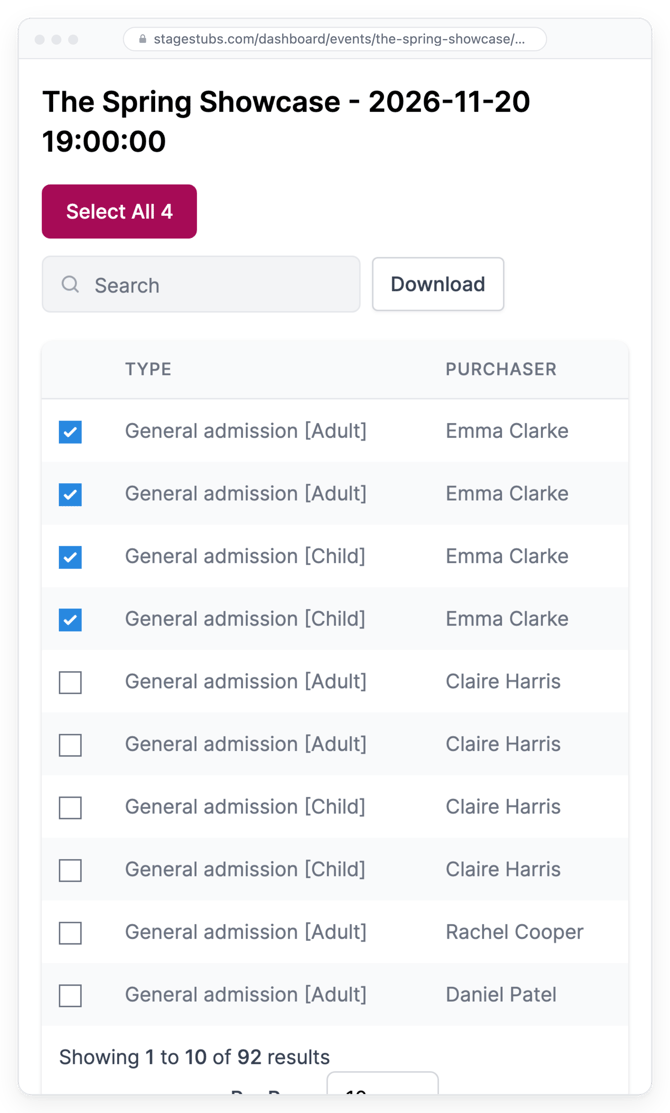
- Open the Tickets tab.
- Tick the tickets or seats you're giving away.
- Choose Download to get them as a PDF.
- Email them to your guests, or print them out.
Option 2: a blank ticket
A blank ticket is a PDF with your show's name, date and venue, but no seat and no code, so you can write a name and seat on it by hand. It's lovely for a handwritten touch, but it can't be scanned, so let your door team know to expect them.
To get one, go to My Events, click View, then View showing, open the Tickets tab and click Download Blank Ticket.
Common questions
Can blank tickets be scanned? No, so let your door team know to expect them.
Related guides: Reserving or blocking seats · The Stage Stubs app
Need a hand? Email us at hello@stagestubs.com and we'll be happy to help.