![stage-stubs-logo.svg]](https://help.stagestubs.com/hubfs/stage-stubs-logo.svg)
Quick answer: To keep tickets private on Stage Stubs, add a password to your event: switch on Password protection when creating it, or click Add a password on a live event. The event page stays visible, but buyers must enter the password to see and book tickets. Passwords aren't case-sensitive.
Some shows are just for a particular audience: a dress rehearsal for parents of the cast, a members' evening, or a performance for one school. Adding a password means only people who know it can book.
Your event page stays visible, so people can still read all about the show, but they'll need the password before they can see and buy tickets.
When you're creating your event
Under Additional Settings, switch on Password protection and type the password you'd like to use. Then carry on setting up and publish your event as normal.
On an event that's already live
- Go to My Events and click View next to your event.
- Find Event Password Protection and click Add a password (or Change the password if there's one already).
- Type the password and click Save.
To remove the password, click Change the password, empty the box and click Save. Anyone will then be able to book.
What families will see
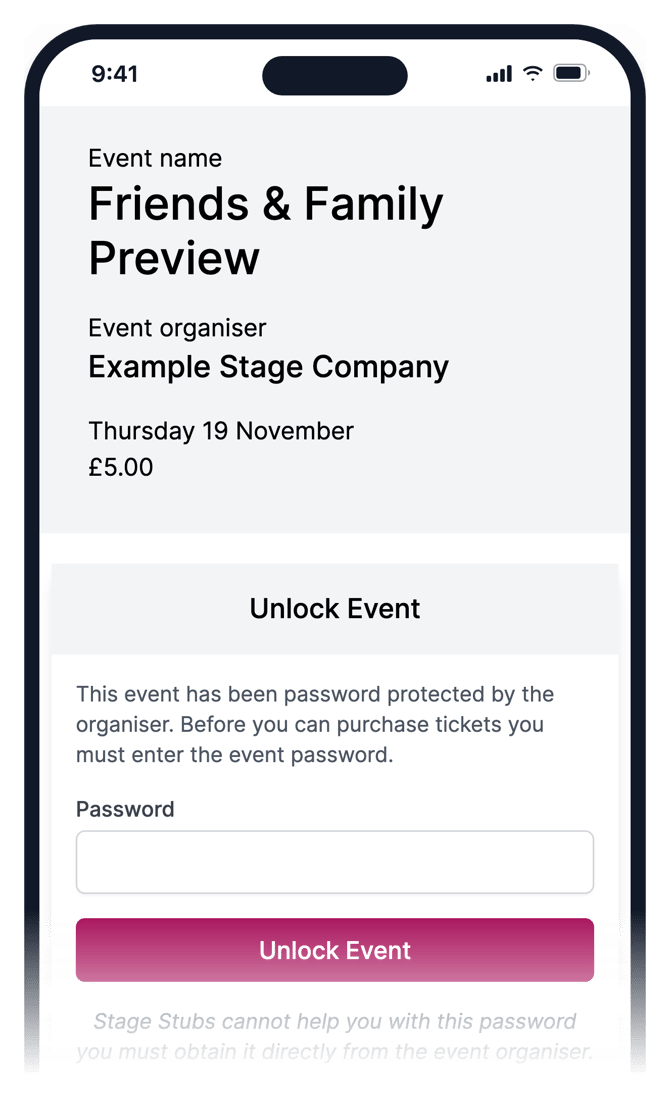
Where the tickets usually appear, families see a box asking for the password. As soon as they type it, the tickets appear. The same password works for every date of the event.
Good to know
Passwords aren't case-sensitive, so "Showtime" and "showtime" both work. Pick something easy to share but hard to guess, and only send it to the people you're inviting.
Families who follow you aren't emailed about password-protected events, so your private shows stay private.
Common questions
Can people still see my event without the password? Yes, the page is visible. Only the tickets are hidden.
Does one password work for every date? Yes.
Related guides: Limiting tickets per buyer · Families who follow you
Need a hand? Email us at hello@stagestubs.com and we'll be happy to help.